Choose Synthesia if
- You want to pay $39, once.
- You are on Windows, iPad, or Android, or want it on every device.
- You want structured practice with progress tracking and finger hints.
- You want an optional sheet-music view next to the falling notes.
Synthesia gets you started with falling notes for $39. LumaKeys adds recording, editing, transcription and video export, on Mac.
Synthesia pioneered learning piano from falling notes, and it's still a good way to start. I learned from Synthesia videos myself, then built LumaKeys for everything after: record and edit your own version, turn piano audio into notes, keep your repertoire in one place, and export it as a video.
| Feature | Synthesia | LumaKeys |
|---|---|---|
| The basics | ||
| Price | $39 one-time | $69 for a limited time, then $99 |
| Subscription | None | None |
| Refunds | 120 to 180 days, no questions asked | 14 days |
| Platforms | Windows, Mac, iPad, Android tablets | macOS, Apple Silicon and Intel |
| Learn | ||
| Falling notes, no sheet music | ||
| Loop and slow down | ||
| Hands separate | ||
| Progress tracking and finger numbers | — | |
| Optional sheet-music view | — | |
| Song library | 150 built in, Music Store, any MIDI or MusicXML | Curated set, any MIDI or audio |
| Create and keep | ||
| Record your playing | Simple multitrack recorder | MIDI or computer keys, per hand |
| Piano-roll editing | — | |
| External piano plugins | — | Pro |
| Make it beautiful and share | ||
| Customizable visuals and looks | Color themes, note colors and labels | Looks with particles, glow and backgrounds |
| Video export for social | Separate Video Creator from 2017 | 16:9 and 9:16, 60 fps, 4K on Pro |
| Audio to MIDI transcription | — | 5 on Free, unlimited on Pro |
Sources: Synthesia features Synthesia price and platforms Synthesia downloads, version history and Video Creator Synthesia on the App Store (iPad) LumaKeys pricing

Play it in from a MIDI keyboard or your computer keys, per hand, and keep every take in your library.

Every recorded note is editable in a piano roll. Fix the one wrong chord instead of playing the whole page again.
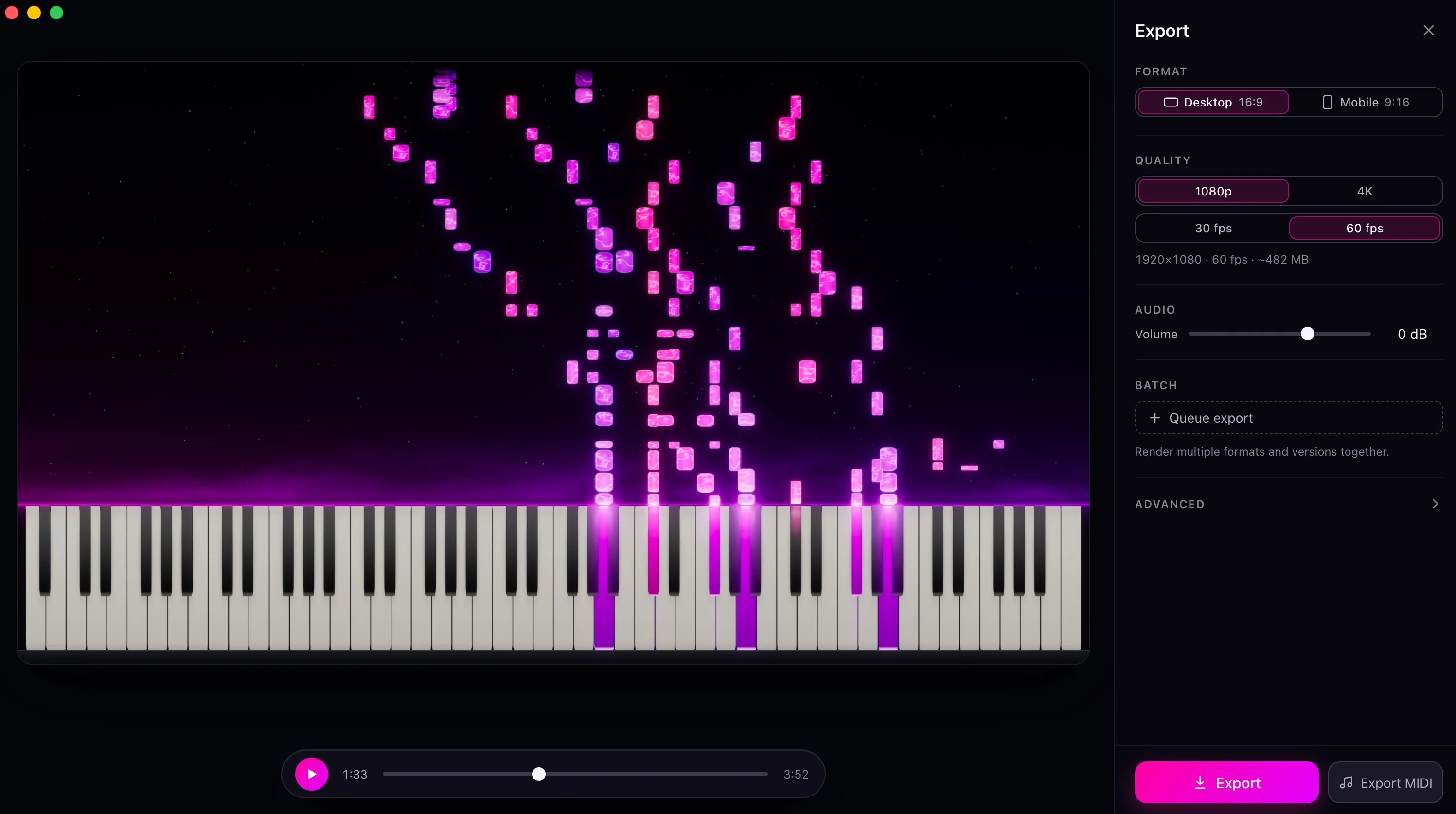
Choose a look, pick 16:9 or 9:16, and export up to 4K at 60 fps, ready for YouTube, TikTok, or Reels.
Notes fall toward the keys, you play them as they land, and the app tells you how you did. It runs on Windows, Mac, iPad and Android.
It also has a few things LumaKeys doesn't: finger numbers on the notes, progress tracking per song, and a sheet-music view.
Synthesia is built around playing along. It has a simple multitrack recorder but no editor for what you record, no audio to MIDI, and its video export is a separate Video Creator from 2017 that, in Synthesia's own words, sometimes has trouble running on certain systems.
That's where I ended up juggling YouTube, a DAW, a video editor and a folder of MIDI files. LumaKeys puts all of that in one app.
Comparing more apps? See all Synthesia alternatives, or ask me.
Yes, on Mac. Same falling notes, plus recording, editing, audio to MIDI, a repertoire library and 4K video export in one app.
Not yet. LumaKeys runs on Mac, Apple Silicon and Intel, and a Windows version is in progress. If you need Windows, iPad or an Android tablet, Synthesia is the pick.
No. LumaKeys Pro is $69 for a limited time, then $99. Synthesia is about $39. Both are one-time purchases. LumaKeys does a lot more, and the free tier lets you try all of it before paying.
Yes. Drop in any MIDI file or a piano recording, and it becomes a playable, editable piece in your library.
Only through a separate Video Creator from 2017 that, in Synthesia's own words, sometimes has trouble running on certain systems. LumaKeys exports up to 4K at 60 fps, landscape or vertical, in your own look.
macOS 12 or later · On an Intel version?
Pro is $69 for a limited time, then $99. See all Pro features.